免费数据库管理工具 DBeaver 中文版DBeaver 适用于开发人员,SQL 程序员,数据库管理员和分析人员的免费多平台数据库工具。支持任何具有 JDBC 驱动程序的数据库(基本上意味着- ANY 数据库)。EE 版本还支持非 JDBC 数据源(MongoDB,Cassandra,Couchbase,Redis,BigTable,DynamoDB 等)。
DBeaver 具有很多功能,包括元数据编辑器,SQL 编辑器,丰富的数据编辑器,ERD,数据导出/导入/迁移,SQL执行计划等。DBeaver 基于 Eclipse 平台开发。
使用插件架构,并为以下数据库提供附加功能:MySQL / MariaDB,PostgreSQL,Greenplum,Oracle,DB2 LUW,Exasol,SQL Server,Sybase / SAP ASE,SQLite,Firebird,H2,HSQLDB,Derby,Teradata,Vertica,Netezza ,Informix 等。
开源免费数据库管理工具 DBeaver 中文版
DBeaver 是一款简单,可靠的软件,面向需要管理多个SQL数据库,执行SQL脚本,迁移连接和查看图的用户。
兼容多个数据库系统
不管您选择连接哪个数据库,例如 MySQL,Firebird,MS Access,PostgreSQL,SQLite或DB2,该应用程序都支持多个连接,因此您可以轻松地管理和组织表,视图,触发器和过程。
首次启动 DBeaver 时,可以选择一种新的连接类型,然后指定允许您连接到所选数据库的信息。之后,位于应用程序左窗格中的“数据库导航器”面板将显示所有可用数据库以及它们的触发器,索引和表。
如果选择一个表,则可以查看有关该表的常规详细信息,例如列,外键,使用的触发器,分区甚至DDL语法(用于定义数据结构,尤其是数据库模式)。
轻松创建 SQL 脚本
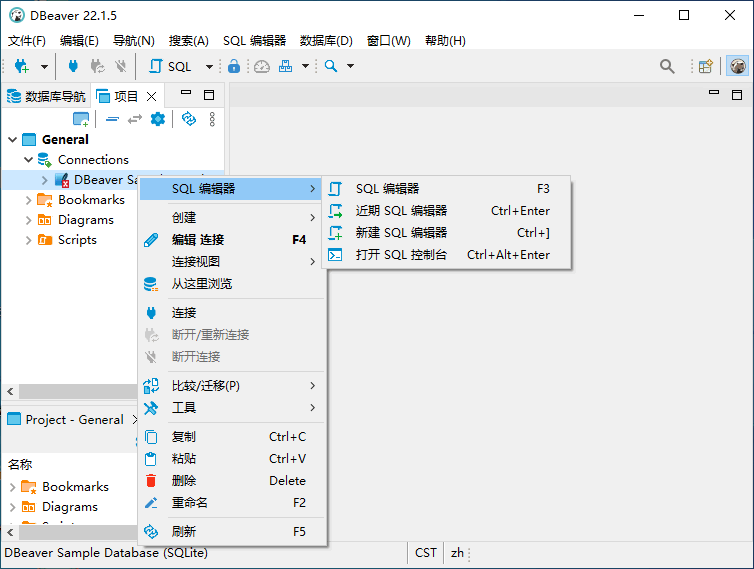
通过“项目”面板,您可以查看所有可用的连接以及创建的脚本。此外,还可以通过使用从“SQL编辑器”菜单中的合适的选择创建新的 SQL 脚本。
通过访问“数据库”菜单,您可以添加新连接,将事务处理模式更改为“可序列化”,“可重复读取”或“已提交读取”。另外,您可以使用“驱动器管理器”选项来管理每个数据库的 ODBC 驱动程序。这样,您可以指定驱动程序名称,选择其类别,设置其示例 URL 地址,然后添加新库。这样的驱动器充当应用程序和 DBMS 之间的转换层,因此您可以轻松地连接到特定的数据库。
作为便携式实用程序,您可以随身携带该应用程序,无论它在可移动驱动器上何时何地,都可以在任何计算机上使用。因此,它不会创建注册表项,您只需删除其包含的文件夹即可将其删除。
总结起来,在管理从简单到复杂的多个数据库连接,触发器,过程和视图以及执行SQL脚本时,DBeaver 被证明是一种稳定有效的解决方案。
DBeaver 许可证
APACHE 许可证 2.0 官方主页
What’s new in DBeaver 22.3.5
February 19, 2023
ChatGPT smart completion:
Completion popup UI was improved
Metadata scope configuration was added
Redundant config options wer removed
Data editor:
Accessibility support was significantly improved (context menu, additional keyboard shortcuts)
Filtering and ordering icons visibility configuration was added again
Dictionary viewer was fixed (issue with missing dictionary values)
“Save filters” button was removed from custom SQL queries results
App crash on geometry viewer opening was resolved in the latest version of MacOS
SQL editor: query text extraction was fixed (issue with trailing comment after query text)
Database backup/restore: issue with external tools running was resolved (Linux)
Application fonts were unified. Now we have only Main and Monospace fonts configuration
Data transfer: data type mapping now respects type name case (for databases with different default case)
Variables support in database tasks was fixed
Database tools wizard: redundant task configuration page was removed
SQL generator dialog now show progress to avoid UI freeze on big schemas
Issue with opening ERD files from disk ws resolved
Clickhouse: DDL for array columns was fixed
Databricks: additional metadata was added
Exasol: default connection parameters were updated (thanks to @allipatev)
IRIS (ex Cache): driver version was updated
Oracle: stored procedures invocation syntax was improved
Snowflake: driver now uses single database connection for all editors (configurable)
SQL Server:
Driver version was updated to 11.2.3. Trust server certificate option was moved to the main connection page
Server messages (printed on raiserror) reading was fixed
Multiple resultsets reading was fixed (extra error handling was added)
VARCHAR(MAX) data type support was added
SQLite: converting binary columns into string representation was fixed
资源:031.rar
解压密码:www.dayanzai.me
转载请保留出处,谢谢合作~ 点击下载(提取码:k7ep) 点击下载(提取码:536766) 点击下载(提取码:536766) 点击下载(提取码:xhrx)