星界边境 简单MOD汉化教程 怎么汉化MOD
这里以Vending Machines V1.09(自动售货机)这个mod为例
首先原始是这样的
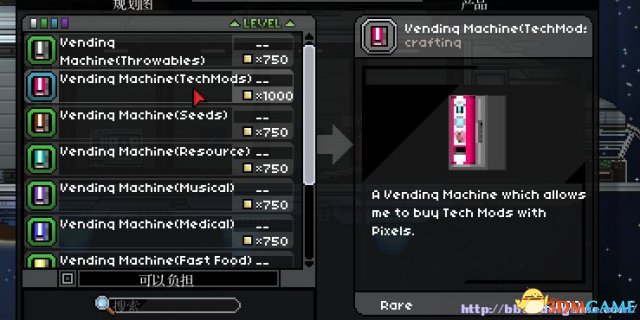
比如我想汉化VendingMachine(Techmods)
先找到这个项目的文件所在路径,比如VendingMachines\objects\generic\VendingMachineTechmods\VendingMachineTechmods.object
打开是这样的,红字部分是上图中的物品名称和描述部分
{
"objectName" : "VendingMachineTechmods",
"rarity" : "rare",
"objectType" : "interactable",
"interactAction" : "OpenCraftingInterface",
"interactData" : {
"config" : "/interface/windowconfig/VendingMachineTechmods.config",
"filter" : [ "VendingMachineTechmods" ]
},
"printable" : true,
"description" : "A Vending Machine which allows me to buy Tech Mods with Pixels.",
"shortdescription" : "Vending Machine(TechMods)",
"race" : "generic",
"category" : "crafting",
"price" : "1000",
"apexDescription" : "A Vending Machine which allows me to buy Tech Mods with Pixels.",
"avianDescription" : "A Vending Machine which allows me to buy Tech Mods with Pixels.",
"floranDescription" : "A Vending Machine which allows me to buy Tech Mods with Pixels.",
"glitchDescription" : "A Vending Machine which allows me to buy Tech Mods with Pixels.",
"humanDescription" : "A Vending Machine which allows me to buy Tech Mods with Pixels.",
"hylotlDescription" : "A Vending Machine which allows me to buy Tech Mods with Pixels.",
"inventoryIcon" : "VendingMachineTechmodsicon.png",
"orientations" : [
{
"leftImage" : "VendingMachineTechmodsleft.png:default",
"rightImage" : "VendingMachineTechmodsright.png:default",
"imagePosition" : [-8, 0],
"frames" : 1,
"animationCycle" : 0.5,
"spaceScan" : 0.1,
"anchors" : [ "bottom" ],
"collision" : "platform"
}
]
}
starbound中文使用的是Unicode,所以汉化前要进行编码转化,上网搜一下很多


然后把转化好的代码粘贴进要替换的地方,比如这样
"printable" : true,
"description" : "\u4e00\u4e2a\u80fd\u591f\u7528\u50cf\u7d20\u8d2d\u4e70\u5404\u79cd\u79d1\u6280\u7684\u81ea\u52a8\u552e\u8d27\u673a.",
"shortdescription" : "\u81ea\u52a8\u552e\u8d27\u673a\uff08\u79d1\u6280\uff09",
"race" : "generic",
"category" : "crafting",
"price" : "1000",
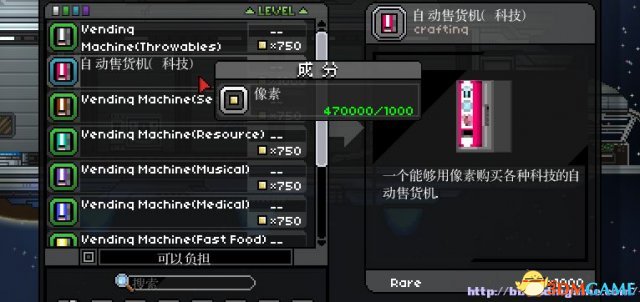
保存好后汉化就成功了,进游戏效果如下
点击进入3DMGAME《星界边境》游戏论坛专区 |