RJ TextEd 是一个支持 Unicode 的全功能文本和源编辑器。RJ TextEd 是使用 Embarcadero 的 Delphi 开发的,并作为免费软件发布。 它也是一个非常强大的 Web(PHP,ASP,JavaScript,HTML 和 CSS)开发编辑器。 功能扩展到文本文件之外,包括支持 CSS/HTML 编辑,集成 CSS/HTML 预览,拼写检查,自动完成,HTML 验证,模板等。 该程序还有一个双窗格文件命令器,以及一个(S)FTP 客户端来上传您的文件。 以下是一小部分可用功能。

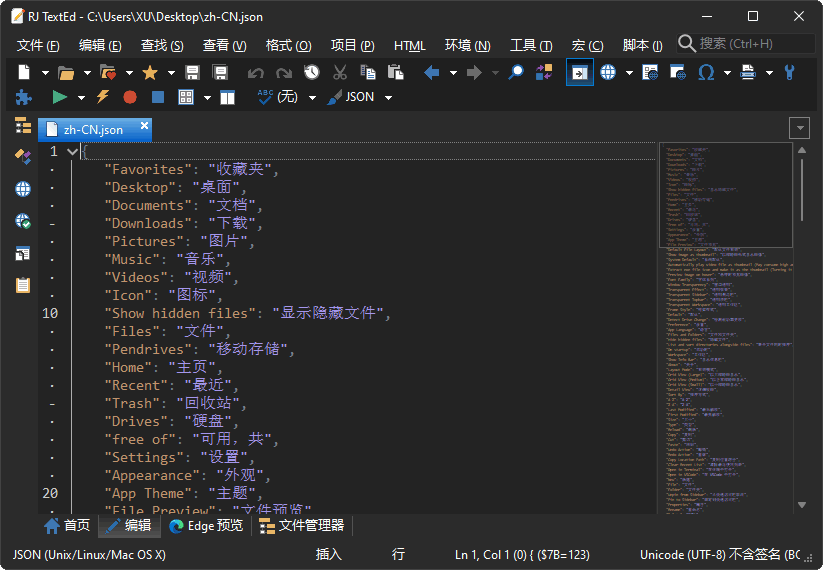
Unicode 全功能文本和源编辑器 RJ TextEd 中文版
RJ TextEd 特征
每个监控 DPI 感知。自动完成。代码折叠。列模式。多重编辑和多重选择文件地图注释栏高级排序。处理 ASCII 和二进制文件。CSS 和 HTML 向导。高亮显示 CSS/SASS/LESS 中的颜色。高级颜色提示,可以在颜色格式之间进行转换。可停靠的面板。FTP 和 SFTP 客户端同步。文件浏览器,文本剪辑,代码浏览器,项目管理…在代码页,Unicode 格式和文本格式之间进行转换。Unicode 和 ANSI 代码页检测。打开/保存没有签名(BOM)的 UTF-8 编码文件。Unicode 文件路径和文件名。HTML 验证,格式和修复。
可用的工具,如语法编辑器,颜色选择器,charmap …
上面没有列出许多功能。 包括拼写检查,电子邮件支持,带正则表达式的高级搜索。 要了解有关该程序的更多信息,您可以查看截图,或者尝试一下。 该程序是完全免费的。
RJ TextEd 是一款非常强大的文本编辑器,可以完成几乎所有类型的文本编辑任务,包括格式化、语法检查、脚本编写和自动完成等,这使得它能够极大地提高文本编辑的效率。
RJ TextEd 可以让用户更加轻松地编辑文件,界面简洁,可以支持多种文件格式,它还支持语法高亮和多种相关工具,例如语法校验和代码补全,可以帮助用户更加方便地编写代码,而且用户还可以自定义字体和颜色,以便更好地掌握代码的逻辑。
总的来说,RJ TextEd 是一款非常优秀的文本编辑器,它可以让用户更加方便、快捷地编辑文件,具有多种功能,同时界面也十分友好,可以帮助用户更加高效地完成文本编辑任务。
RJ TextEd 许可证
免费软件
官方主页
What’s new in RJ TextEd Version 15.80 (Feb 12, 2022)
Color nested braces
Braces are drawn using different color depending on nesting level.
E.g. in (10-(a+2)) the first matching (…) pair may be drawn using an orange color while the inner (a+2) pair are drawn using a blue color.
This can be turned off in “Environment->Themes->Customize…”. Find the checkbox on the “Symbols” row.
This change affect all (), [] and {} brace pairs.
1580_BraceHighlighting.png
1580_BraceHighlighting.png (13.21 KiB) Viewed 53 times
Highlight nearest braces
Added option to highlight the nearest braces that encloses the text cursor.
Braces highlighted are (), [] and {}. The editor will always try to find the nearest left and right braces, from the text cursor, and highlight them.
It’s turned on by default, but can be turned off in options.
braceHighlighting.png
braceHighlighting.png (7.96 KiB) Viewed 637 times
Highlight identifiers under cursor inside method
Added option to highlight the current word or identifier under the text cursor, for all instances of the word inside the current method.
It’s turned on by default, but can be turned off in options.
highlightWords.png
highlightWords.png (9.49 KiB) Viewed 548 times
JavaScript (JSDoc)
Made several changes to the highlighter and added support for JSDoc comments.
All JSDoc tags are highlighted e.g. @param {string} value, but also any other tag used. E.g. @dummy is highlighted.
JSDoc.png
JSDoc.png (12.55 KiB) Viewed 1101 times
PHP (DocBlocks)
Made some changes to the highlighter and added support for DocBlocks.
All DocBlock tags are highlighted and checked strictly. No other tags are highlighted. E.g. @dummy is not highlighted.
phpDocBlock.png
phpDocBlock.png (14.19 KiB) Viewed 1101 times
PowerShell
Made several changes to the highlighter.
ps.png
ps.png (8.92 KiB) Viewed 1101 times
Cpp (Doxygen)
Made some changes to the highlighter and added support for Document commands (Doxygen).
All doc commands are highlighted and checked strictly. No other commands are highlighted. E.g. @dummy is not highlighted.
Goto (Ctrl+G)
Selected word, or word under cursor is now added to the “Functions” find field.
This makes it easier and faster to navigate to a function in the code. Just place the cursor at a function name, press Ctrl+G, select the function in the list, if not already selected and press enter.
Fix commonly reported bugs
In this version I tried to fix two common issues. Highlight issues after some editing and exceptions after closing the program.
I found a lot of highlighting issues while scanning the code. They should all be fixed now. I also fixed several close down issues. Mostly in third party components.
Options
The default highlighter in “Highlight and margin” and “Font and tabs” are now set to “All languages”.
If you want to set individual settings for e.g. PHP – select PHP in the highlighters dropdown list.
Check for updates
Made some option changes. You can now auto check for
* major version updates
* minor version updates
* beta version updates
This allows you to e.g. skip all minor updates and only install major updates.
Install update
Changed the way the program is closed down when updating the program.
The close procedure is now similar to the normal exit procedure and should prevent some issues, reported by some users.
Help file (chm)
If a help file is available, it will be used instead of the online help.
Fixed
* Several highlighting issues when editing.
* Several errors when closing the program.
* Highlighter issue when open remote file.
* Bookmarks on empty lines.
* Highlight matching braces.
* Toggle browser view issue.
* Vertical/Horizontal split issues.
* A few brace highlight issues.
* Pressing close button repeatedly could cause an error.
* Issue in Delphi library when closing application.
* High DPI issues when clicking checkboxes in themes dialog.
* Focus error in options window.
* Undo issue in column mode.
* If the program was minimized and forced to close, it should start as normal window.
* Several other minor issues reported by users.
https://www.rj-texted.se/download.html
资源:1858.rar
解压密码:www.dayanzai.me
转载请保留出处,谢谢合作~
点击下载(提取码:tper)
点击下载(提取码:536766)
点击下载(提取码:536766)
点击下载(提取码:p7gh) |